
Level Guitar Patches with MeterMaid

Your ears are lying to you.
If you play two guitar tones back to back, and one of them is just a little bit louder, your brain will usually decide the louder one sounds better.
"Oh, it sounds more full. Punchier. Clearer. More alive. Better tone!"
I also see the same question asked across Facebook groups and forums for all types of digital modelers: "How do I level my patches?" And, most of the time, the answer is, "Just use your ears!"
But you can't trust your ears.
I've run into this a lot while building patches or comparing patches I've downloaded for my Line 6 Helix gear. I'll switch back and forth between two patches, tweak a few settings, and think, "Oh yeah, that's lots better." Later, I realized the only reason I liked it was that it was 2 or 3 dB hotter than the patch before it.
My brain wasn't comparing tone. It was getting bribed.
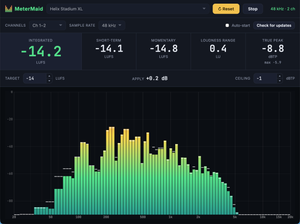
So I built a small desktop app to objectively normalize all of my patches. It's called MeterMaid, and it measures loudness in real time so I can level my guitar patches properly instead of guessing.
The patch-leveling problem
Having consistent signal levels not only helps me to objectively compare patches (with different amp models, clones, effects, signal chains, etc.), but it's also extremely helpful to whoever is mixing sound. I've spent a lot of time on both sides of a mixing board, and I know the sound engineer would really appreciate consistent levels from my gear.
It's okay to have a lead tone that adds something like +3db to the output for a solo. That's a very intentional change in loudness. For everything else,
there's Mastercardyou need a rock-solid, consistent level.
I currently use three Helix modelers:
- Helix Stadium XL
- The OG Helix Floor (my backup)
- HX Stomp XL, for bass guitar and lighter gigs
I almost always take a patch-per-song approach. Each patch may use a different amp model or amp clone, and they most certainly have a different combination of overdrives and other effects. Some effects are turned on/off for verse, chorus, bridge, and other song sections.
Every effect in the signal chain can potentially change the output signal, and comparing the changes with just my ear is deceptive. Without matching loudness across all blocks in the chain, I can't trust the comparisons.
My formula is to measure every patch and every effect in the patch's signal chain, both on and off, so that the loudness remains very consistent.
Note: A peak meter tells you the loudest instant in the signal. A loudness meter tells you how loud something feels over time. A spiky, clean tone and a compressed wall-of-sound distortion tone can hit similar peaks while feeling very different in terms of volume.
LUFS: the weird audio acronym you need to know
The broadcast and streaming world already solved this problem with a standard called ITU-R BS.1770, along with EBU R128. (Don't worry, there won't be a test later.)
That gives us LUFS, which stands for Loudness Units relative to Full Scale. LUFS is designed to measure perceived loudness. Not just "how tall was the biggest waveform spike," but "how loud does this actually seem to a human listener?"
MeterMaid measures:
- Integrated loudness: the overall loudness averaged across the whole measurement (use the Reset button to start a fresh average)
- Short-term loudness: measured over about 3 seconds
- Momentary loudness: measured over about 400 milliseconds
- Loudness Range: which gives a sense of dynamics
- True Peak: to help catch clipping
- A frequency spectrum: because seeing the weird spike at 800 Hz is sometimes helpful
- A target loudness helper, which tells me how much gain to add or remove
My workflow is now pretty straightforward:
- Plug the Helix into my computer over USB.
- Open MeterMaid and make sure the correct audio source is selected.
- Optional: Isolate the target amp/clone/effect in my signal chain that needs leveling.
- Click Start.
- Play the biggest chords (e.g., E, A, D).
- Watch the integrated LUFS reading.
- Use the Apply value to adjust the output.
- Click Reset to start a new average.
- Repeat 5-8 until I hit my target or I question all my life choices.
If one patch measures -16.7 LUFS and my target is -14 LUFS, MeterMaid tells me to add +2.7 dB of gain to my signal chain.
Tip: The integrated reading (and the gain suggestion that comes from it) is a long-term average of everything MeterMaid has heard since you started measuring. It smooths out the moment-to-moment swings of playing. But it also means it won't jump the instant you change your output level, because the earlier, louder (or quieter) signal is still baked into the average. After you make a change, click Reset, play for a few seconds, and the suggested gain will settle on the new value.
That's it. That's the whole magic trick.
Now, when I compare two amp models at the same loudness, and one still sounds better, I can trust that a little more. My ears are still lying, but at least now I have receipts.
LUFS Target: Streaming platforms often normalize music to around -14 LUFS, podcasts to around -16 LUFS, and TV broadcasts to -23 LUFS. For leveling guitar patches, just pick a target and be consistent. I personally like -14 LUFS because I can play along with streaming music or backing tracks from my computer without making adjustments, and it helps me know if my guitar tone "sits well in the mix."
Tauri vs Electron: the nerdy details
I wanted MeterMaid to be a desktop app. My go-to choice for a desktop app with a web UI for many years has been Electron. I really like it. Electron is great when you want to build a desktop app using web technologies, want to stick to JavaScript or TypeScript, and you need consistent UI behavior across Mac, Windows, and Linux. You get the power of Node.js and Chromium bundled into your app. But you also get the weight of Node.js and Chromium at around 270+ MB! And, memory usage starts around 300MB 😳
I've recently discovered Tauri. Tauri lets you build the frontend with HTML, CSS, and TypeScript, while the backend runs in Rust. Instead of bundling Chromium and Node.js as Electron does, Tauri uses the operating system's built-in webview:
- WKWebView on macOS
- WebView2 on Windows
- WebKitGTK on Linux
The result is a much smaller app (usually less than 10MB) and much lower memory usage (around 50MB).
I don't think there's one correct answer here. These are both good tools. They just optimize for different things.
| Tauri | Electron | |
|---|---|---|
| Typical app size | 10 MB | 270+ MB |
| Memory usage | 50 MB | 300 MB |
| UI rendering | OS webview | Bundled Chromium |
| UI consistency | Depends on OS webview | Very consistent |
| Backend language | Rust by default;sidecar feature | Node.js / JavaScript |
Electron's biggest strength is also its hightest cost: it ships Chromium with your app. That means consistent rendering, modern web APIs, and fewer surprises across platforms. For a big, complex app, that's a very reasonable tradeoff.
For MeterMaid, I didn't need all that. I needed a window, some controls, a canvas, and a native audio engine. Plus, Rust is what all the cool kids are doing.

Electron gives you Node.js as a first-class part of the runtime. Tauri’s default backend story is Rust, but it can also bundle and launch external binaries as sidecars, including a packaged Node.js process. For MeterMaid, though, the real audio/DSP work fit Rust better, so I didn’t need to bring Node along for the ride.
How MeterMaid works
MeterMaid has two main pieces:
- A Rust audio engine that captures audio, analyzes loudness, and calculates spectrum data
- A TypeScript frontend that shows the meters and lets me control the app
The frontend does not process audio directly. It asks Rust to start and stop capture, listens for metric updates, and draws the latest values.
If you want even more nerdy 🤓 details, all the code is open source.
Go level something
MeterMaid exists because I got tired of fighting guitar patches. Will this make me a better guitar player?
No. Unfortunately, that still requires practicing. Rude. ANYWAY...
If you use a digital modeler, such as Line 6 Helix, Fractal Axe-FX, Quad Cortex, Fender Tone Master Pro, ToneX, Boss, HeadRush, or anything else that needs consistent loudness, give it a try. And let me know your thoughts on it!
Comments
11 archived comment(s) from this site's previous comment system. These are read-only — join the discussion above.
I receive an error each time I try to start the analysis.
Can you give me any other details about the error? Is there an error message? Are you running on Windows or Mac, and which version of Windows or Mac?
Thanks David! I updated to the newest version and the error code received mentioned turning on Microphone access for desktop apps. Once turned on, everything worked as expected.
Glad to hear it's working now!
I've published a new version. It probably won't fix whatever issue you're seeing, but it should report more information on what's happening. Please install, try again, and let me know what the app reports. Thanks! https://github.com/reverentgeek/metermaid/releases/latest
I’ve been waiting for an app like this for a long time...seriously, thank you! I just finished leveling all my presets. Like you, I run a dedicated preset with snapshots for each song in Band #1, and with my other band, I use one full-blown preset with all 8 snapshots that covers everything from ’70s tones to modern rock. This tool finally makes managing all of that so much easier. BRAVO!!!
Awesome!! I'm glad to hear it's helped you :)
I'm super excited for this app! Just installed it and did the drop down menu to my helix, pressed start and no readings. Please help
Are you on Mac or Windows? And, which version? Are you using Helix Floor/LT or Helix Stadium?
On Mac (intel) and Stadium
Did you allow access to the Microphone? It's a little misleading, but you must grant permission for the app to use any audio source. You can enable this by going to System Settings -> Privacy & Security -> Microphone and toggle on MeterMaid. Let me know if that's the fix. I've got access to an Intel Mac, so if you're still having an issue, I'll see if I can reproduce.