
Make Chord Charts in Your Browser with Charter
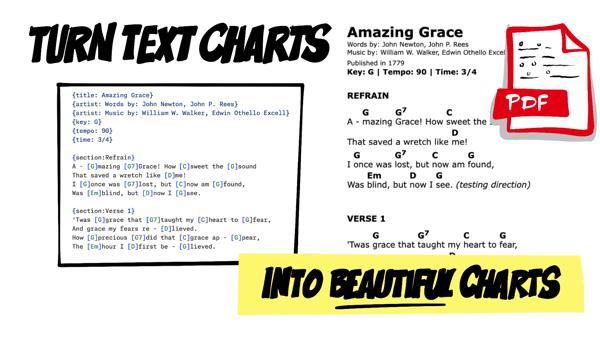
Charter has been around since 2016. It's a little CLI Node.js app I built that takes a ChordPro text file and turns it into a clean chord chart you can print or import into a chord chart app like Paperless Music. Back in 2020, I wrote about how it uses Puppeteer to render those charts to PDF.
It works great! As long as you have Node.js installed, are comfortable in a terminal, and don't mind downloading a copy of Chromium. That might be a lot to ask of someone who isn't a developer and just wants to print a song.
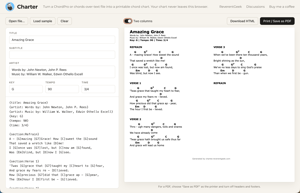
To make beautiful chord charts more accessible to everyone, there's now a web version: charter.reverentgeek.com. Paste a chart, see it rendered as you type, and print it. That's it!
What is ChordPro, anyway?
ChordPro is a plain-text format for songs. Metadata like the title and key go in curly-brace directives, and chords go in square brackets right before the syllable where the change happens.
{title: Amazing Grace}
{artist: John Newton}
{key: G}
{time: 3/4}

{section: Verse 1}
A[G]mazing [G7]grace, how [C]sweet the [G]sound
That saved a wretch like [D]me
Because the chords live inside the lyric, nothing drifts out of alignment when you change fonts or column widths. Charter reads all of that and lays it out with the chords floating above the right words.
Take it for a spin
Head over to charter.reverentgeek.com. Here's what you can do once you're there.
- Bring a chart: Paste ChordPro into the editor, click Open file…, or drag a file onto the editor. It takes
.cho,.chordpro,.crd,.proand.txtfiles. Don't have one handy? Click Load sample. - Edit the song details: The title, subtitle, artist, key, tempo and time signature each get their own field above the editor. Change one, and the matching directive in the ChordPro text updates for you (and the other way around).
- Watch it render: The preview redraws a moment after you stop typing, and it keeps your scroll position, so you're not yanked back to the top of the song on every keystroke.
- Try two columns: The Two columns toggle squeezes a longer song onto fewer pages. It doesn't suit every chart, so give the preview a look before you print.
- Print it or keep it: Print / Save as PDF opens your browser's print dialog. Download HTML saves the chart as a single HTML file with its stylesheet built in, so it looks right on its own.
Pro tip: For a PDF, pick "Save as PDF" as the printer and turn off the browser's headers and footers. Otherwise your beautiful chart gets a URL and a date stamped across the top.
Chords over text? No problem
A lot of the charts floating around the internet aren't ChordPro. They're "chords over text," with the chords on their own line, lined up with spaces above the lyrics.
Amazing Grace - John Newton
Key: G
Time: 3/4

[Verse 1]
 G      G7         C         G
Amazing grace, how sweet the sound
                         D
That saved a wretch like me
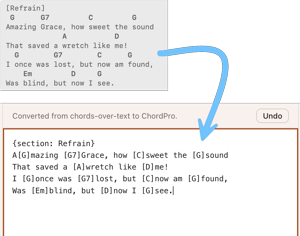
Paste or open something like that, and Charter converts it to ChordPro for you. That example becomes the exact ChordPro from the previous section: the "Title - Artist" line turns into title and artist, the Key: and Time: lines become directives, [Verse 1] becomes a section, and each chord lands in the lyric at the column it was sitting above.
It also knows to skip things that sit on a chord line without being chords, like bar lines, repeat signs, N.C. and x2. Tabs are expanded to spaces first, because a single tab character can quietly shove every chord on the line into the wrong spot.
If the conversion isn't what you wanted, a notice appears above the editor with an Undo button that puts your original text back.
Your chart stays put
Everything happens in your browser. The parsing, the conversion and the rendering all run as JavaScript on the page, so the song you paste is never uploaded anywhere. There's no account, no server and nothing to sign up for.
It's the same code the command-line app uses. The web build copies Charter's parser, ChordPro converter and HTML renderer straight into the site, and none of them needed any outside dependencies to come along for the ride. Fix a bug in the CLI, and the web app gets the fix too.
How it gets published
The web app lives in the web/ folder of the Charter repo. A GitHub Action named "Web app" lints, tests and builds the site on every push, and pushes to main get deployed to GitHub Pages.
There's one small wrinkle with GitHub Pages: it lets browsers cache files for ten minutes, so right after a deploy, someone could get the new page with yesterday's stylesheet or script. The build stamps every relative URL with a hash of the whole build (app.js?v=1a2b3c4d), so the files always change together.
Want to run it yourself? Clone the repo, then build and serve it.
pnpm install
pnpm run build:web
npx serve dist
Note: The site has to be served over HTTP. Opening
dist/index.htmlstraight from disk won't work, because browsers block the JavaScript module imports fromfile://URLs.
The CLI is still there, too, if you'd rather convert a whole folder of charts to PDF in one go.
What's next?
If you find a chart that Charter doesn't convert or render the way you'd expect, let me know! Share it in GitHub Discussions, along with what you expected the chart to look like. Odd chords-over-text layouts are especially welcome. Every issue is a learning opportunity to support something new.
Go print some music and play it loud! 🎸